Choose any published game from the library and play it immediately in the browser simulator.
PICK → PLAY → CUSTOMIZE → FLASH
Pick a game.
Customize it locally.
Play the official library immediately in the browser, adjust supported game settings with the visual editor, then flash the same GamePack to your NovaStep RP2040 Game Kit.
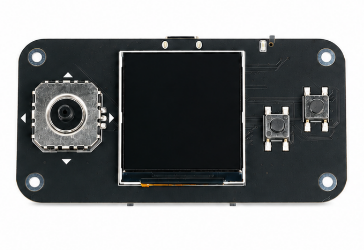
NovaStep RP2040 Game Kit240×240 display · joystick · A/B/Start/Select · MicroPython
OFFICIAL LIBRARY
Play first. Customize second.
Search by game name, category, description or controls, then play instantly.
Browser Simulator
Pocket Tanks
POCKET MUSICUpload a song for your RP2040The browser converts your file locally. The preview and downloaded UF2 use the same final ADPCM audio bytes.
No song uploaded yet.Supported when your browser can decode it: MP3, WAV, M4A/AAC, OGG.
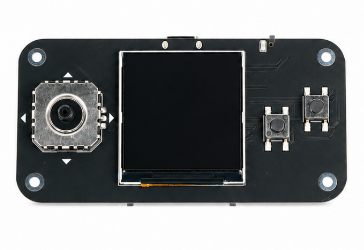
Keyboard
W/↑ UpS/↓ DownA/← LeftD/→ Right
J A buttonK B buttonEnter Start/PauseShift Select
Click/touch the real controls above, or use the keyboard.
Drop images here or paste from clipboard
Pixel Gallery · max 8 · fixed 120×120 · 16 colors · packed 4bpp
Drag thumbnails to reorder. Delete unwanted images. Hardware: ←/→ switch image · B toggles automatic slideshow.
Keyboard: W/A/S/D or Arrow keys · J=A · K=B · Enter=Start/Pause · Shift=Select
Virtual MMA7660 Motion LabMotion input
Tilt & shake simulatorDrag the pad to change the gravity vector, or use Shake. Motion-aware games react immediately.
tilt
screen gravity x 0.00 · y 1.00
Visual Game Editor
Replace Character from ImageScene templates only · converted locally to a tiny hardware-safe sprite.
No custom sprite.Maximum 24×24, 4 visible colors + transparency. No original photo is stored.
Advanced GameSpec JSON
Use the visual controls above for normal editing. Advanced JSON is optional. Browser preview and hardware use the same GamePack payload. Runtime 22 supports legacy GameSpec 11 games and uploadable Game API 1 / GameSpec 12 packages.
One library, one local workflow
Use the visual editor, supported media tools, or advanced GameSpec JSON without any account or authorization code.
Test first, then send over Web Serial or generate the GamePack UF2 locally in the browser.